
SDK integration
Verify your integration
Check that a test device delivered the data its configuration asks for.
After a test recording, one request tells you whether the device’s data reached truemetrics and
matches the configuration the device was last served: per-sensor counts and rates, the upload
mode, the traffic limit, and your customer metadata. The answer is ok, or failed with one
reason per failed check.
Use it to check a test run. It is not a monitoring API.
If you integrate with the agent prompt, its final step runs this test and explains the result.
1. Get the device ID
The SDK generates the device ID. Read it from the first Initialized status after init() and
store it next to the test session, for example in your logs or your backend. Do not copy it
earlier: while the SDK is still Initializing, the ID can change once the configuration arrives.
import androidx.lifecycle.lifecycleScope
import io.truemetrics.truemetricssdk.TruemetricsSdk
import io.truemetrics.truemetricssdk.engine.state.Status
import kotlinx.coroutines.flow.filterIsInstance
import kotlinx.coroutines.flow.first
import kotlinx.coroutines.launch

// In an Activity or Fragment, after init()
lifecycleScope.launch {
    val initialized = TruemetricsSdk.getInstance().observeSdkStatus()
        .filterIsInstance<Status.Initialized>()
        .first()
    log("truemetrics device ID: ${initialized.deviceId}")
}
The device ID changes periodically, and clearing the app’s data creates a new one. Check a recording with the ID that was current while it ran. If the app switched to another API key, check with the new key: only data sent under it counts, so test after the switch.
2. Record a test session
The whole test takes about 50 to 75 minutes, most of it waiting.
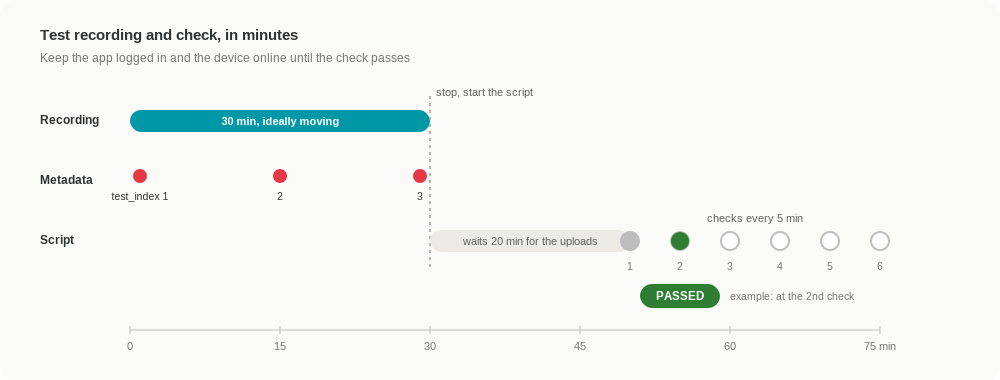
- On a device that has not recorded earlier that UTC day, wait until the SDK reports
Initialized(metadata logged before that is lost), then record for 30 minutes, ideally while moving (walking or driving). Finish before 00:00 UTC: the whole UTC day is checked. - During the recording, at about minutes 1, 15 and 29, log 3 test metadata objects with
eventTypeintegration_test, the sametest_run_id(any unique ID) and atest_indexof1,2and3, as shown below. Keep this out of your release build. - Stop the recording with your app’s stop trigger or a debug action, not by logging out. Keep the app logged in and the device online until the check passes: the SDK uploads the end of the recording after the stop, and after a logout it uploads nothing until the next login.
- Start the check script right away. Data reaches truemetrics with the SDK’s uploads, typically 10 to 20 minutes after it was recorded, plus about a minute of processing, so the script waits 20 minutes and then checks every 5 minutes, up to 45 minutes after the stop.
To repeat the whole test on the same day, clear the app’s data on the test device first, or use another device. The device then gets a new ID, so the earlier run does not count.
Logging one test object:
import io.truemetrics.truemetricssdk.TruemetricsSdk
import io.truemetrics.truemetricssdk.metadata.StandardMetadata
import java.util.UUID

// SDK 1.6.0 or newer; on older versions pass "" for every standard field.
val testRunId = UUID.randomUUID().toString() // one per test run

// At about minutes 1, 15 and 29, with test_index "1", "2" and "3"
TruemetricsSdk.getInstance().logMetadata(
    StandardMetadata(
        eventType = "integration_test",
        extra = mapOf("test_run_id" to testRunId, "test_index" to "1"),
    )
)
3. Check the result
The test passes when status is ok, config is device, and customer_metadata has at least 3
entries whose fields include test_run_id and test_index. Values are never returned, so count
the entries. With config unavailable the rates were not checked, so ok is only a partial
result.
Check script
The script below runs the whole check; the agent prompt takes it from this page. It needs Python 3.8 or newer and nothing else, on macOS,
Linux and Windows. Start it right after the recording stops, with your SDK API key, the one your
app initializes the SDK with, in TRUEMETRICS_API_KEY. Set the variable from where you keep the
key rather than typing the key into a command, for example with
read -rs TRUEMETRICS_API_KEY && export TRUEMETRICS_API_KEY in bash or zsh, or
$env:TRUEMETRICS_API_KEY = Read-Host -MaskInput in PowerShell 7:
python3 check_integration.py b3f0c2e4-5a1d-4c9e-9f3a-2d7e8c1b6a40 # the device ID from step 1On Windows, run it with py instead of python3. If it reports no answer with
CERTIFICATE_VERIFY_FAILED on macOS, run the Install Certificates command that comes with the
python.org installer once.
"""Checks a test recording against GET /testresult. Start it right after the recording stops:
    python3 check_integration.py <device ID> [YYYY-MM-DD], with the key in TRUEMETRICS_API_KEY
Waits 20 minutes, then checks every 5 minutes until 45 minutes after the stop.
Exit code: 0 passed, 1 failed, 2 the check could not run, 3 wrong key or request.
Needs Python 3.8 or newer, nothing else.
"""

import datetime
import json
import os
import sys
import time
import urllib.error
import urllib.parse
import urllib.request

URL = "https://geodata.truemetrics.cloud/V1/testresult"


def utc_now():
    return datetime.datetime.now(datetime.timezone.utc)


def test_objects(result):
    """Metadata entries that carry both test fields."""
    return sum(
        1
        for entry in result.get("customer_metadata") or []
        if {"test_run_id", "test_index"} <= set(entry.get("fields") or [])
    )


def summary(result, names):
    """The given fields of a result, plus its number of test objects."""
    shown = {name: result.get(name) for name in names}
    shown["test_objects"] = test_objects(result)
    return json.dumps(shown, indent=2)


def fetch(url, key):
    """One request: the HTTP status (0 for no answer) and the body."""
    request = urllib.request.Request(url, headers={"x-api-key": key})
    try:
        with urllib.request.urlopen(request, timeout=60) as response:
            return response.status, json.load(response)
    except urllib.error.HTTPError as error:
        return error.code, error.read().decode(errors="replace")
    except (urllib.error.URLError, OSError, ValueError) as error:
        return 0, str(getattr(error, "reason", error))


def main():
    key = os.environ.get("TRUEMETRICS_API_KEY")
    if len(sys.argv) not in (2, 3) or not key:
        print("usage:", __doc__.splitlines()[1].strip(), file=sys.stderr)
        return 3
    device_id = sys.argv[1]
    # The recording's UTC day, fixed before the wait.
    day = sys.argv[2] if len(sys.argv) == 3 else utc_now().date().isoformat()
    query = urllib.parse.urlencode({"id_device": device_id, "date": day})
    print(f"Checking device {device_id} for {day} (UTC).", flush=True)

    time.sleep(int(os.environ.get("WAIT_SECONDS", "1200")))
    last = None
    for check in range(1, 7):
        if check > 1:
            time.sleep(300)
        status, body = fetch(f"{URL}?{query}", key)
        answer = f"HTTP {status}" if status else f"no answer ({body})"
        print(f"{utc_now():%H:%M} UTC, check {check} of 6: {answer}", flush=True)
        if status == 200:
            ok = body.get("status") == "ok" and body.get("config") == "device"
            if ok and test_objects(body) >= 3:
                print("PASSED", summary(body, ("counts", "recording_minutes")), sep="\n")
                return 0
            last = body
        elif status in (400, 403):
            print(body)
            if status == 403:
                print("Wrong API key, or the key is not enabled for this check: ask truemetrics.")
            return 3

    if last is not None:
        print("FAILED", summary(last, ("status", "reasons", "config", "counts")), sep="\n")
        return 1
    print("The check could not run: this is not a test result. Try again later.")
    return 2


if __name__ == "__main__":
    sys.exit(main())
It prints PASSED, or FAILED with the result’s reasons (see
Reading a failed result); test_objects below 3 means the test
metadata did not arrive. Exit code 2 means the check could not run, which is not a test result:
run it again later with WAIT_SECONDS=0, which checks without waiting, and the UTC day it printed
at the start as the second argument. Pass that day too whenever you start it after 00:00 UTC.
Single request
DEVICE_ID=b3f0c2e4-5a1d-4c9e-9f3a-2d7e8c1b6a40 # the device ID from step 1
printf 'x-api-key: %s\n' "$TRUEMETRICS_API_KEY" |
  curl -sS -w '\nHTTP %{http_code}\n' -H @- \
  "https://geodata.truemetrics.cloud/V1/testresult?id_device=$DEVICE_ID"
One call, for a quick look (bash or zsh). The key goes to curl on stdin, so it stays out of process lists. You only see devices that last fetched
their configuration with your key. Without date, today (UTC) is checked. If you check after
00:00 UTC, add the day of the test, e.g. &date=2026-10-28.
Parameters
Your SDK API key. Identifies your account; you only see your own devices.
The device ID from step 1. Letters, digits, ., _ and -, at most 64 characters.
The UTC day to check, YYYY-MM-DD: today or one of the 29 days before it. Raw sensor data is
not kept longer. When you check after midnight UTC, pass the day of the test, or the new, empty
day is checked.
The endpoint is shared by all customers and rate-limited for all of them together. Call it from a test script or a debug tool, at most every 5 minutes during a test. Do not poll it continuously or call it from your production app.
What is checked
The checks follow the configuration the device was last served.
| Check | Passes when |
|---|---|
| Accelerometer, gyroscope | More readings than the minimum, and a measured rate of at least 75% of the configured frequency. Not checked when the sensor is off in the configuration, or in stats_only mode, where the device uploads summaries instead of raw readings. |
| Location | Same rule, on fused location, or on GNSS location when only that is on. Not checked when location is off. |
| Customer metadata | The device sent at least one metadata object that day. |
| Traffic limit | Not reached. When the served configuration tells the SDK to stop recording, this is the first reason. |
In metadata_triggered mode the SDK uploads sensor data only around metadata events. If the
device sent neither metadata nor sensor readings that day, the missing metadata is the only reason
(besides a reached traffic limit), since the empty sensors follow from it.
When the device’s configuration is unknown, config is unavailable. The rates are then not
checked; the counts and the customer metadata still are.
Response
{
  "id_device": "b3f0c2e4-5a1d-4c9e-9f3a-2d7e8c1b6a40",
  "date": "2026-10-28",
  "status": "ok",
  "reasons": [],
  "counts": { "gyro": 0, "acc": 35460, "gps": 1796 },
  "recording_minutes": 30.0,
  "sensors": {
    "gyro": { "expected": false, "source": "gyroscope", "configured_hz": 0.0, "count": 0, "hz": 0.0,
              "active_minutes": 0, "max_gap_minutes": 0.0, "note": "gyroscope is off in the config" },
    "acc":  { "expected": true, "source": "accelerometer", "configured_hz": 20.0, "count": 35460,
              "hz": 19.7, "active_minutes": 31, "max_gap_minutes": 0.1 },
    "gps":  { "expected": true, "source": "fusedlocation", "configured_hz": 1.0, "count": 1796,
              "hz": 0.9977, "active_minutes": 31, "max_gap_minutes": 0.1 }
  },
  "config": "device",
  "upload_mode": "upload_always",
  "customer_metadata_count": 3,
  "customer_metadata": [
    { "t_utc": 1793190540.0,
      "fields": ["address_raw", "id_delivery_external", "id_tour", "lat_reference_external",
                 "lat_waypoint_external", "lon_reference_external", "lon_waypoint_external", "t_event",
                 "test_index", "test_run_id", "type_event"] },
    { "t_utc": 1793189700.0,
      "fields": ["address_raw", "id_delivery_external", "id_tour", "lat_reference_external",
                 "lat_waypoint_external", "lon_reference_external", "lon_waypoint_external", "t_event",
                 "test_index", "test_run_id", "type_event"] },
    { "t_utc": 1793188860.0,
      "fields": ["address_raw", "id_delivery_external", "id_tour", "lat_reference_external",
                 "lat_waypoint_external", "lon_reference_external", "lon_waypoint_external", "t_event",
                 "test_index", "test_run_id", "type_event"] }
  ]
}ok when every check passes, otherwise failed.
One human-readable entry per failed check, naming the value and the bar it missed. Empty when
status is ok.
The device ID that was checked.
The UTC day that was checked.
Readings received that day for gyro, acc and gps.
How long the device recorded that day, pauses left out. Each sensor’s hz is measured against it.
Per check (gyro, acc, gps), what the configuration asks for and what was measured.
Show propertiesHide properties
Whether the configuration asks for this sensor. A sensor that is not expected is not checked.
The configuration sensor checked: accelerometer, gyroscope, fusedlocation or
gnsslocation.
The frequency in the configuration; null when the configuration is unknown.
Readings received that day. A reading sent twice counts once.
count divided by the recording time; null when the device recorded nothing that day.
UTC clock minutes with at least one reading. Far below recording_minutes means the sensor
stopped while the device kept recording.
Longest gap between readings that day, pauses between recordings included.
Why the sensor is not expected, when it is not.
device when the checks used the configuration this device was last served; unavailable when
it is unknown.
The upload_mode of that configuration, e.g. upload_always or metadata_triggered.
How many customer metadata objects the device sent that day.
The metadata the device sent that day, newest first, at most 200: when each was recorded
(t_utc, Unix seconds) and its field names (fields; null for metadata that is not a JSON
object). Values are never returned. An event
logged as StandardMetadata always has the nine standard keys (t_event, type_event, …),
plus the keys of its extra.
An ID unknown under your key, for example a typo, a device whose SDK never finished initializing,
or a device that uses another API key, returns failed with zero counts, config unavailable
and a single reason (below).
Errors
| Status | Meaning |
|---|---|
400 | id_device is missing or malformed, or date is malformed or outside the last 30 days. The message names the accepted range. |
403 | Missing or invalid x-api-key, or the key is not enabled for this endpoint yet: ask your truemetrics contact. |
429 | The shared rate limit was reached. Try again later. |
500 | The check could not be run. Try again later. |
504 | The check took longer than 29 seconds. Try again later. |
Reading a failed result
| Reason | Usually means |
|---|---|
acc_count 312 <= 1000 (or gyro_, gps_) | The device sent few or no readings: the recording was short or did not run, a permission is missing, or the data has not been uploaded yet (the app was logged out or offline after the recording). |
acc_hz 6.2 < 15 (75% of the configured 20 Hz) | Readings arrived, but slower than configured, for example because the system restricted the app in the background. |
no customer metadata | No metadata was logged that day. See Metadata. |
no customer metadata: in metadata_triggered mode … | In metadata_triggered mode, no metadata and therefore no sensor data either. Log the test metadata, then check again. |
traffic limit reached: … | The account’s traffic limit stopped recording. Contact truemetrics. |
unknown device: … | No SDK has fetched a configuration with this ID under this key: check the ID for typos, that the key is the one the app uses, and that the SDK initialized on the device. |