
1 · In your own map
Option 1 · The last meter in your own map
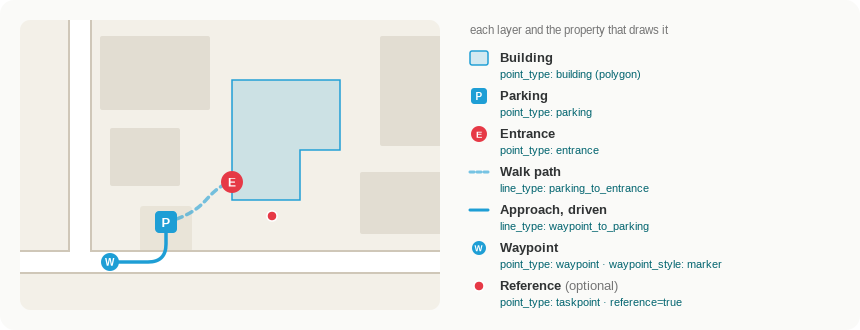
Parking, entrance, waypoint, walk path and building as data, drawn by your own map: from your backend (1A) or from the truemetrics REST API (1B).
With option 1 you keep your own map and your own design, in the courier app, a dispatcher dashboard or anywhere else. truemetrics delivers the last meter of each address as data, learned from all deliveries to it. New deliveries count after the next nightly merge run.
| Element | Description |
|---|---|
| Entrance | The door couriers use at the address. |
| Parking | Where couriers park the vehicle. |
| Waypoint | The street point the courier is routed to, where the approach to the parking starts. The way from the waypoint to the parking is routed for driving. truemetrics learns it from the drives; your own is the waypointLatitude / waypointLongitude you can send in metadata. |
| Walk path | The way on foot from the parking to the entrance. |
| Building | The building footprint the entrance belongs to (when available). |
All coordinates are in EPSG:4326 (WGS84 longitude/latitude).
There are two ways to get this data into your map.
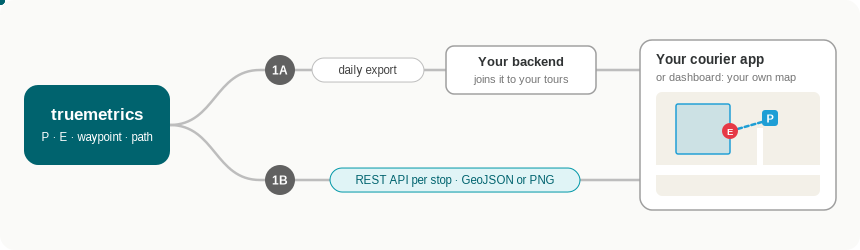
1A · Data from your own backend
truemetrics exports parking places, entrances, waypoints and walk paths to your backend. Your backend feeds them to the courier app, or wherever the visualisation happens, together with the tour. The courier app never talks to truemetrics for the last meter.
truemetrics exports
Every day, the current last meter of all your addresses goes to your cloud storage (AWS S3, Google Cloud Storage) or SFTP server, keyed by the address identifier you send as metadata. See Architecture of the export and the location data format.
Your backend imports
Load the export into your own database. Join it to your addresses by the address identifier.
Your backend hands it out with the tour
When a tour is sent to the courier’s device, add each stop’s parking, entrance, waypoint and walk path, as you already add the address.
Your app draws it
Your map shows the stop with its parking, entrance and walk path. Your navigation can route to the waypoint instead of the address.
Choose 1A when you want the data in your own systems: for planning, for other tools, for devices with poor coverage (the tour carries everything), and with no request to truemetrics at delivery time.
1B · Data from the truemetrics REST API
Your app (or your backend) asks the Last Meter Visualisation API for one stop by its address identifiers and gets back exactly that data, ready to draw:
- a GeoJSON
FeatureCollection(withgeojson=true) you can drop straight onto a MapLibre or Mapbox map. The styling hints (colours, line widths, dashes) map 1:1 to map layer styles, and - optionally a rendered PNG image (
raster), so you can show a thumbnail without running a map renderer yourself: transparent or on a street basemap.
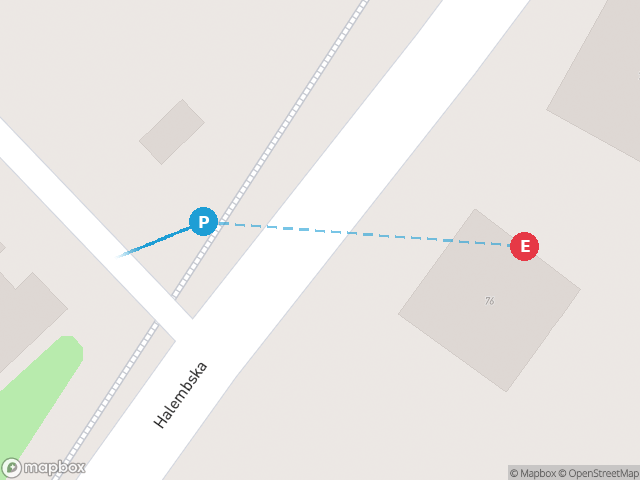
Choose 1B when you want the latest data per stop with the least work on your side, or a picture of the stop in an email, report, ticket or dashboard.
Typical uses:
- Plot the last meter of a stop in your own driver app or dashboard.
- Embed a small map thumbnail of a stop in an email, report or ticket.
- Show dispatchers where couriers park and which door they use at an address.
Authentication
Every request is authenticated with your x-api-key. The key identifies your account, so you
only ever receive your own data: there is no account or customer parameter in the request. See
API keys for which key you need.
The identifiers you pass are the same address identifiers you send to truemetrics as metadata
(your id_address / merge id). The entrance and parking may use different identifiers: pass
each to its own parameter (identifier_entrance / identifier_parking).
Next: the API reference and examples.
1A or 1B
| 1A · own backend | 1B · REST API | |
|---|---|---|
| Data in your own systems | Yes, a full copy | Yes, a full copy, additionally fetched per stop |
| Freshness | Daily export after the nightly merge | After the nightly merge |
| At delivery time | No request to truemetrics | One request per stop (cacheable) |
| Rendering | Your own styling | Styling hints included, or a ready PNG |
| Work on your side | Import, storage, delivery to devices, map | Map, one HTTP call |
Both leave the routing to your own navigation. To get routing to the parking and the walk to the door without building the map yourself, see the truemetrics last meter module.