
3 · Standalone navigation app
Option 3 · truemetrics standalone navigation app
Replace Google Maps or Waze with a navigation made for the last meter, with a few extras on the call your courier app already makes.
Your courier app starts Google Maps (or Waze) for a stop today. The truemetrics standalone navigation app takes the same call, drives the courier to the waypoint and into the parking, shows the walk to the entrance, and switches back to your app on arrival.
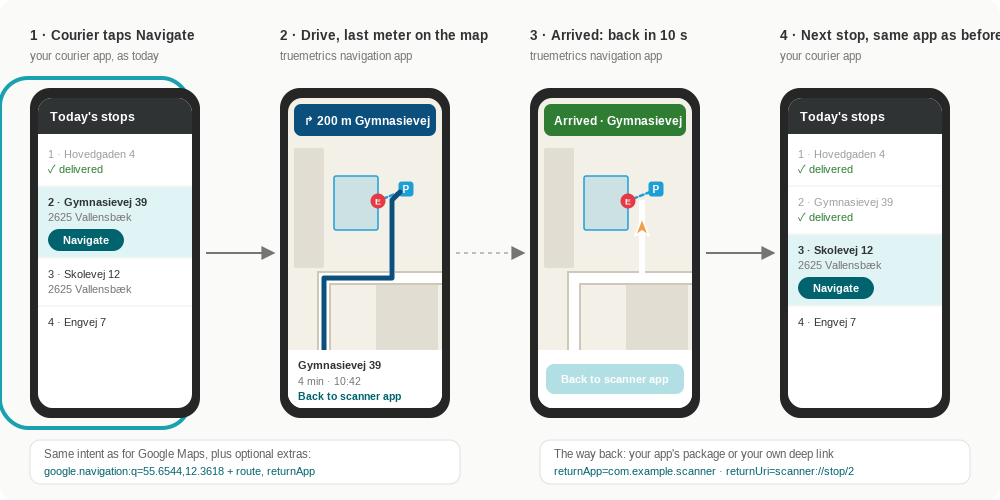
What changes in your app
Three lines on the intent you already send. Google Maps ignores everything beyond the coordinate, so the same call works whether or not the truemetrics app is installed.
val intent = Intent(Intent.ACTION_VIEW, Uri.parse("google.navigation:q=${stop.lat},${stop.lon}&mode=d"))
startActivity(intent)
routeJson builds the tour as in route, from the IDs you send as metadata:
fun routeJson(tour: List<Stop>, nextStop: Int): String = JSONObject()
    .put("stops", JSONArray(tour.map { stop ->
        JSONObject()
            .put("ID", stop.addressId)               // the address_id you send in the metadata
            .put("line1", stop.street)               // "Gymnasievej 39"
            .put("line2", "Planned Arrival ${stop.plannedArrival}")   // "Planned Arrival 14:22"
    }))
    .put("next_stop", nextStop)
    .toString()
Without native code
Flutter, React Native or a web view can open a plain link instead of building an intent: every field is also a query parameter of the link, URL-encoded.
truemetrics.navigation://navigate
    ?q=55.654436,12.361784
    &returnApp=com.example.scanner
    &route=<route JSON, URL-encoded>
returnApp is your own app’s package name (its applicationId); com.example.scanner stands for
it here. The app switches to whichever package is named: another app’s brings that app to the
front, and one that is not installed means no switch at all.
Shown on several lines for reading; the link itself is one line. Use the truemetrics.navigation://
scheme: it opens only the truemetrics app. google.navigation: may open Google Maps when both are
installed.
final route = Uri.encodeComponent(jsonEncode(routeJson));
// returnApp: your own app's package name (applicationId)
final link = Uri.parse(
  'truemetrics.navigation://navigate?q=$lat,$lng&returnApp=com.example.scanner&route=$route',
);
if (!await launchUrl(link, mode: LaunchMode.externalApplication)) {
  await launchUrl(Uri.parse('google.navigation:q=$lat,$lng&mode=d'));   // not installed
}
Install the app
truemetrics provides the app (package io.truemetrics.navigation) for your devices, for example
through your MDM. On first start it asks for location and, at the first drive, for notifications
(Android 13+). The API key is set up by truemetrics; your courier app needs none.
The handover
The same link a courier app sends to Google Maps, google.navigation:q=<lat>,<lng>&mode=d, with
the fields below as intent extras. Or, as a full link with every field a query parameter:
truemetrics.navigation://navigate?q=55.654436,12.361784&returnApp=com.example.scanner&route=%7B%22stops%22%3A%5B%7B%22ID%22%3A%22%3Caddress_id%3E%22%2C%22line1%22%3A%22Gymnasievej%2039%22%2C%22line2%22%3A%22Planned%20Arrival%2014%3A22%22%7D%2C%7B%22ID%22%3A%22%3Caddress_id%3E%22%2C%22line1%22%3A%22%C3%98sterbyvejen%2033%22%2C%22line2%22%3A%22Planned%20Arrival%2014%3A41%22%7D%5D%2C%22next_stop%22%3A1%7Dwith route decoded:
{"stops":[{"ID":"<address_id>","line1":"Gymnasievej 39","line2":"Planned Arrival 14:22"},{"ID":"<address_id>","line1":"Østerbyvejen 33","line2":"Planned Arrival 14:41"}],"next_stop":1}q must be <lat>,<lng>, optionally followed by (label). An address instead of coordinates is
rejected (no geocoding).
Every field below except q can be an intent extra or a query parameter of the link (URL-encoded); an
extra wins over a parameter of the same name. Extras are strings, except simulate
(boolean, or the string "true"/"false").
The stop: <lat>,<lng> in WGS84 degrees, as for Google Maps. Used for routing and the map when
there is no last meter for the stop.
The tour and the stop to drive to. Brings the last meter and the address on the card. See
route. Should it be missing or unreadable, the app still drives to q, but without a
last meter.
Your app’s package name, to switch back to on arrival or Back. Brings your app to the front as a tap on its icon does.
A browsable deep link of your app, opened to switch back instead of returnApp, for example to
land on the stop’s delivery screen: scanner://stop/2. file:, content:, intent: and android-app: links are
ignored.
route
The whole tour (up to 200 stops) and which of its stops comes next:
{
  "stops": [
    { "ID": "<address_id>", "line1": "Gymnasievej 39", "line2": "Planned Arrival 14:22" },
    { "ID": "<address_id>", "line1": "Østerbyvejen 33", "line2": "Planned Arrival 14:41" },
    { "ID": "<address_id>" }
  ],
  "next_stop": 1
}| Field | Meaning |
|---|---|
next_stop | Index in stops of the stop to drive to, counted from 0. |
ID | The stop’s address_id, as sent in the metadata: typically your address identifier or route point identifier. It tells the app where to guide the courier and which last meter to show. A string or a number. |
ID_sec | Optional, usually left out. Only if your system uses a second identifier for the stop (for example a separate parking or route point next to the address), and only if truemetrics asked for it. |
line1, line2 | Optional: the card’s two lines, e.g. street and number, and a second line of your choice such as the planned arrival or postcode and city. Each on one line, cut with ”…” when longer. line2 shows only with line1; without line1 the card shows the (label) from q, if any. |
The stop at next_stop is the one the courier is navigated to; send the whole tour all the same,
the other stops are used as well. Other fields are ignored. A route that cannot be read, a
next_stop outside the list or a stop with none of these fields counts as no route: the app
drives to q without a last meter.
The switch back
With returnUri or returnApp, the app switches back 10 s after arrival, and its Back button does
the same at any time. Whether arrival switches back by itself is part of the configuration
truemetrics keeps for your key (on by default).
The system Back ends the navigation like the Back button: to returnUri or returnApp, else to the
app that was in front before. So that your app comes back as the courier left it, its launcher
activity should be singleTask or singleTop, or use returnUri to a screen of your choice.
What the courier sees
- Route overview. The whole route and a Navigate button, which presses itself after 10 s.
- Drive. Turn-by-turn without voice, to the waypoint, then into the parking. Rerouting with real GPS (up to 5 times per drive by default). One card: address, time left, arrival time, Back.
- Near the stop. A flat view with parking, entrance, walk path and building; “Arriving” and the street replace the turn banner.
- Arrival. Within 30 m of the parking or entrance and slower than 15 km/h for 20 s, the Back button fills up over 10 s, then the app switches back.
The drive goes on with the phone locked or your app in front (a foreground service with a “Navigation is running” notification; a tap leads back). One handover runs at a time: a new one replaces the one before, also for the same stop.
Let an AI agent do it
Integrate the app switch with an AI agent: a copy-paste prompt that finds your app’s Google Maps call, asks you to confirm the mapping, and implements the handover.
For testing and demos
Leave these fields out in production. With them the app drives the route by itself, so a stop can be shown at a desk or in a customer meeting without driving there.
true: the app drives along the route by itself instead of following GPS, with arrival and the
switch back as in a real drive. No rerouting.
Where the simulated drive starts: "<lat>,<lng>". Left out, at the device’s position. A few hundred
metres before the stop, on the road leading in, shows the approach and the last meter in a minute.
A simulated handover from a computer, as your app would send it, with your app’s package as
returnApp (without the simulate and simulationStart options it drives on GPS):
adb shell 'am start -a android.intent.action.VIEW \
  -d "google.navigation:q=55.654436,12.361784&mode=d" \
  -n io.truemetrics.navigation/.ui.navigation.HandoverActivity \
  --es returnApp com.example.scanner \
  --ez simulate true --es simulationStart "55.65624,12.357918"'
The truemetrics test app (“Scanner (test caller)”) hands over stops exactly like this, with a switch for the simulated drive.